


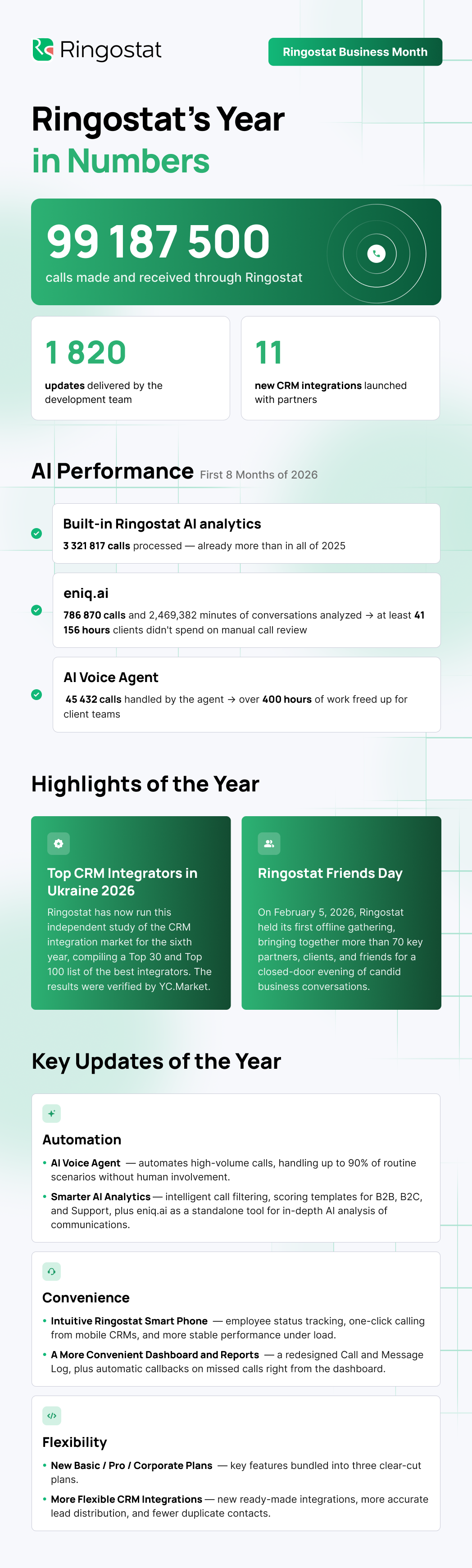
Every autumn, Ringostat looks back at the year ― and this one has been different. We took a major leap forward, moving from “recording and analyzing communication” to “handling part of that communication ourselves.” We launched the AI Voice Agent, which now answers and makes calls instead of sales reps.
On top of that, this year brought a clearer pricing structure, a faster Ringostat Smart Phone, more useful AI analytics, and even more dashboards and CRM integrations.
In total, we shipped 1,820 updates this year. That number keeps growing every year, and it reflects real, ongoing improvements to Ringostat ― not just in response to customer requests, but driven by our own push to keep getting better.
Here’s a rundown of everything new this year, explained in plain terms, along with how these updates help Ringostat users in their day-to-day work. We’re also kicking off a new business season with Ringostat Business Month, our annual promotional offer.
Key Updates
The AI Voice Agent Now Answers and Makes Calls on Its Own
Ringostat launched the AI Voice Agent, a product built to automate high-volume calling ― everything from simple notifications to live, real-time conversations. The agent qualifies leads, answers questions, and hands off complex cases to a sales rep.
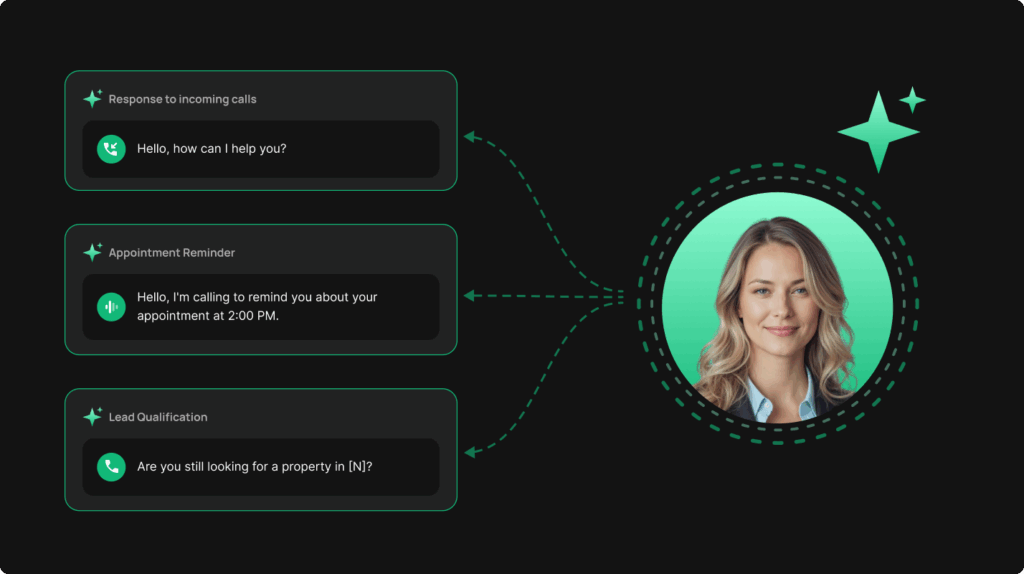
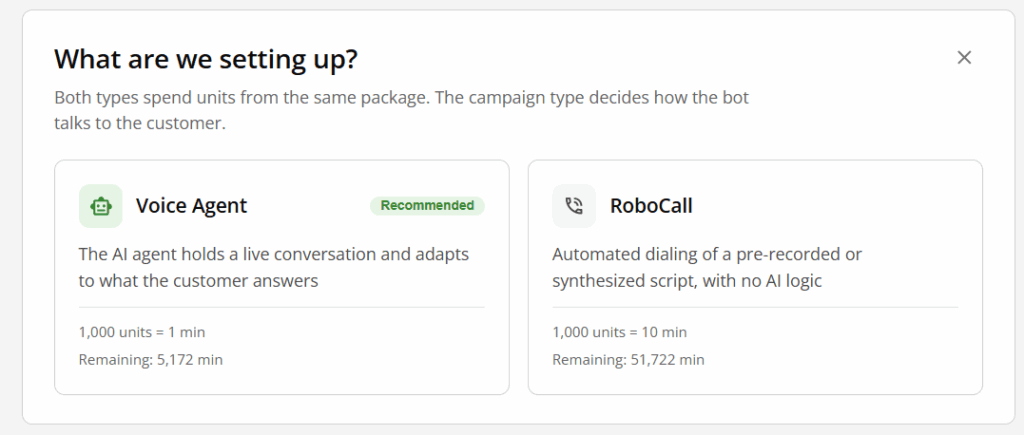
How it works. You set up a campaign, choose a scenario type ― a simple RoboCall or a conversational AI agent ― and upload your contact list via CSV or API.
From there, the agent calls customers on its own: sending payment reminders, confirming orders, announcing deliveries, or running surveys. The most advanced scenario goes well beyond scripted lines ― it’s a conversational AI agent that answers questions, holds a natural real-time conversation, and transfers the call to a sales rep whenever needed.
What this means for your business. Routine calls ― confirmations, reminders, surveys ― eat up hours of your team’s time every day without adding much value on their own. The AI Voice Agent takes these scenarios off your team’s plate and can automate up to 90% of them, handling thousands of calls with no human involvement. A single channel supports up to 1,200 calls a day, so the agent scales to large contact lists without adding headcount.
Use case. A delivery company can’t keep up with order confirmation calls during peak season. The AI Voice Agent works through the entire contact list in a matter of hours, and if a customer has questions, it transfers the call to a live rep right away. No order goes unconfirmed, and the team avoids getting buried in repetitive work.
Read also: AI Voice Agent: A Detailed Look at Ringostat’s Conversational AI Agent
AI Analytics Now Explains Every Decision
This year, Ringostat AI evolved from a spot-check tool into a system teams actually manage, rather than simply use.
What we did:
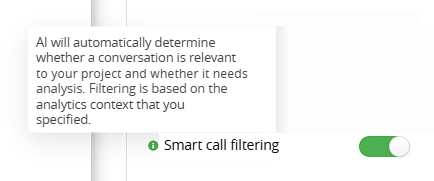
- Added smart call filtering, so you can now decide whether AI should check a conversation’s business relevance before analyzing it
- Expanded call-scoring templates for different business models: B2B, B2C, Support, or Universal
- Made it clear why a specific call was excluded from analysis (not relevant, poor transcription, and so on)
- Moved AI analytics to a per-seat pricing model instead of per-call volume, making costs easier to plan
- Redesigned the call card ― the new interface is now the default in the Call Log and the missed-calls report, with a full mobile version
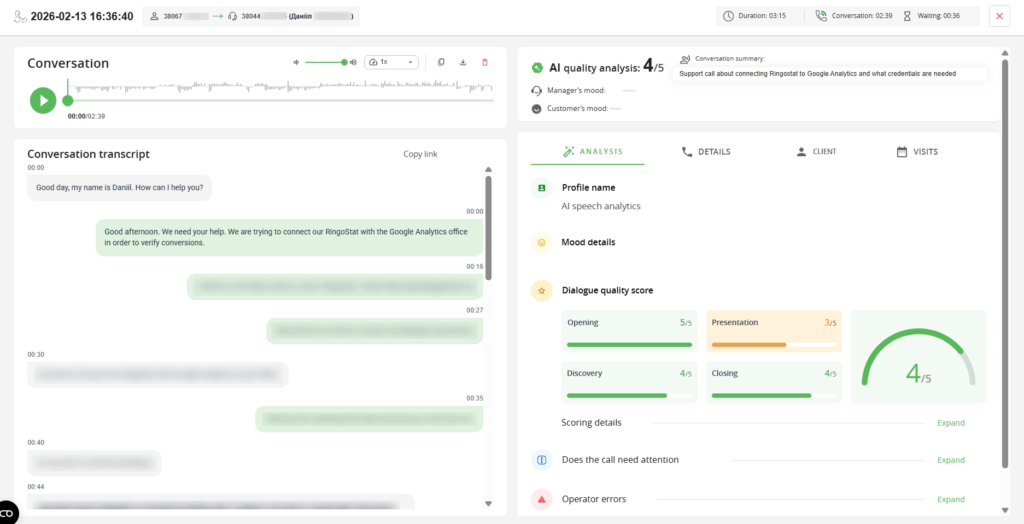
- Launched a dedicated AI call-quality dashboard, letting you go from a metric straight to the relevant call in one click
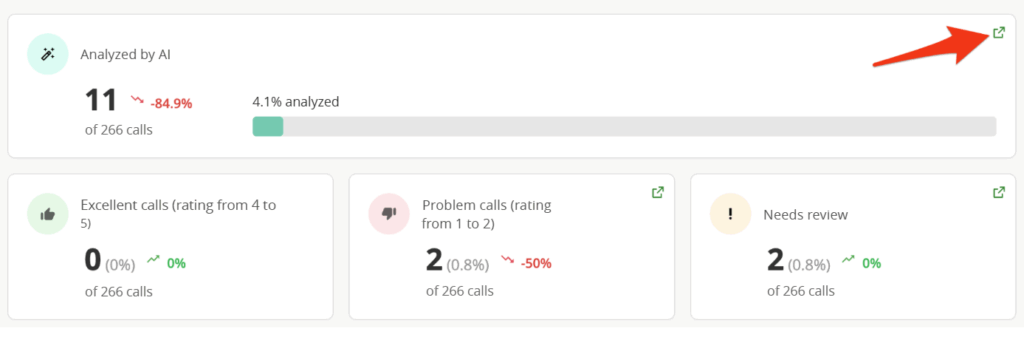
What this means for your business. Managers no longer need to manually listen to a sample of calls to understand how the team communicates with customers. AI reviews every conversation, flags problem areas, and shows exactly where reps struggle and where they perform well.
Use case. A sales manager notices a sharp drop in the average call score on the AI analytics dashboard, clicks on the metric, and lands directly in the Call Log with the right filters already applied. Within minutes, the team is reviewing the specific problem calls instead of hunting for them among hundreds of recordings.
A Dedicated Tool: eniq.ai
Another step forward in AI analytics this year is eniq.ai, Ringostat’s platform for analyzing business communications. Unlike Ringostat AI’s standard speech analytics, which is built around calls out of the box, eniq.ai can turn any type of communication ― calls, chats, even video meetings ― into structured analytics and ready-made insights.
How it works. For each project, you can build a custom prompt or checklist tailored to your company’s specific processes. The system automatically classifies communications based on the triggers you set and routes them to the right checklist. You get the results in whatever format works best for you: a numeric score, a short summary, or a data array for further analysis.
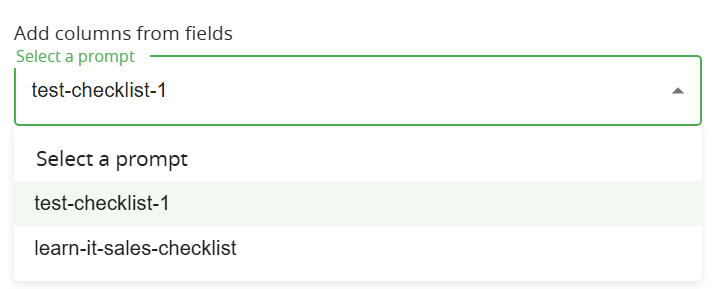
What this means for your business. Managers are no longer limited to spot-checking 5–10% of calls at random. eniq.ai analyzes 100% of communications using a single logic the company defines for its own processes.
Use case. The logistics company DiffReight uses eniq.ai to save nearly a week and a half of work every month that used to go into manually reviewing calls. United Porte, meanwhile, went from spot-checking calls to analyzing 100% of them, cutting the time spent on quality control fivefold.
Pricing Plans That Are Easy to Calculate
Over the past few years, the platform has grown significantly ― more tools, more use cases, more standalone features. The old billing logic, built from scattered charges, was becoming harder to understand and manage. So we rethought not just billing itself, but how users interact with Ringostat’s products overall.
What we did:
- Combined the platform’s core capabilities into three clear pricing plans ― Basic, Pro, and Corporate ― instead of assembling functionality piece by piece
- Added a new plan selection and switching page right in the account dashboard, showing exactly which features are included in your plan
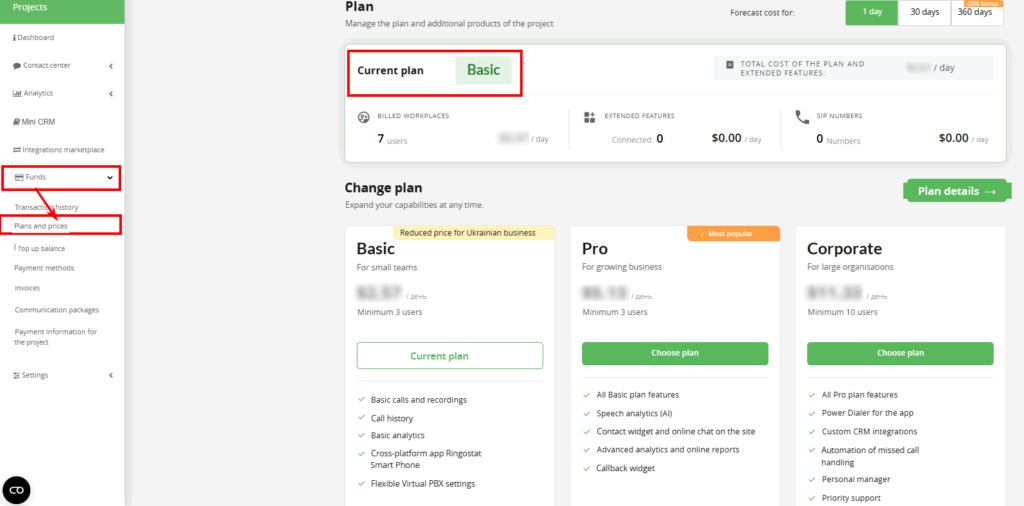
- Updated the logic behind minute packages: if a package runs out before the auto-renewal date, its cost is added to the invoice right away, and once paid, the package reactivates instantly with no downtime in service
- Cleared up unnecessary clutter in the account interface ― sections for inactive products are no longer confusing, and are now neatly grayed out in the menu
What this means for your business. It’s easier to plan expenses and understand exactly what you’re paying for. Managing your account and scaling your toolkit to your team’s specific needs becomes simpler, without having to assemble functionality manually.
Use case. Say a company previously used Ringostat on a basic feature set and occasionally added extra capabilities as new needs came up. Now, that company can simply choose the Pro plan once in the account dashboard and get the full toolkit it needs right away, instead of piecing together functionality over time.
A More Convenient Account and Reporting Experience
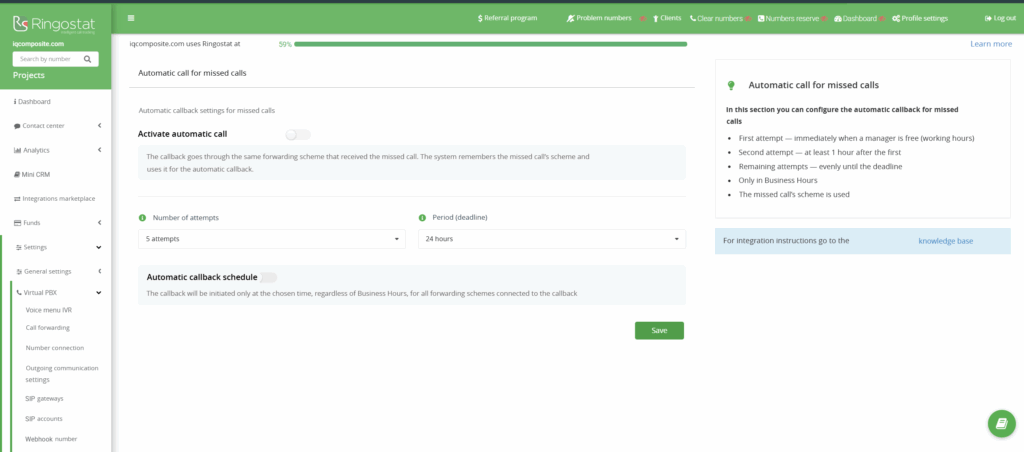
Alongside major releases, we also kept improving the everyday tools our customers use constantly. One example is automatic callback for missed calls: previously, to avoid losing a lead, a sales rep had to track missed calls manually and call each customer back themselves.
That process is now automatic, and you can set it up right from your account. Just go to the “Virtual PBX” tab and select “Automatic callback for missed calls.”
Other things we did:
- Redesigned the Call Log (desktop and mobile) along with an updated player design
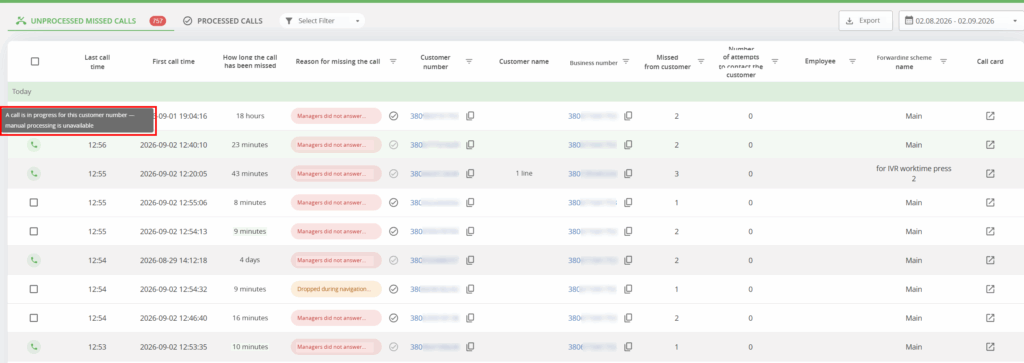
- Updated the report on handled and unhandled missed calls, with flexible filters and real-time visibility into calls currently being processed
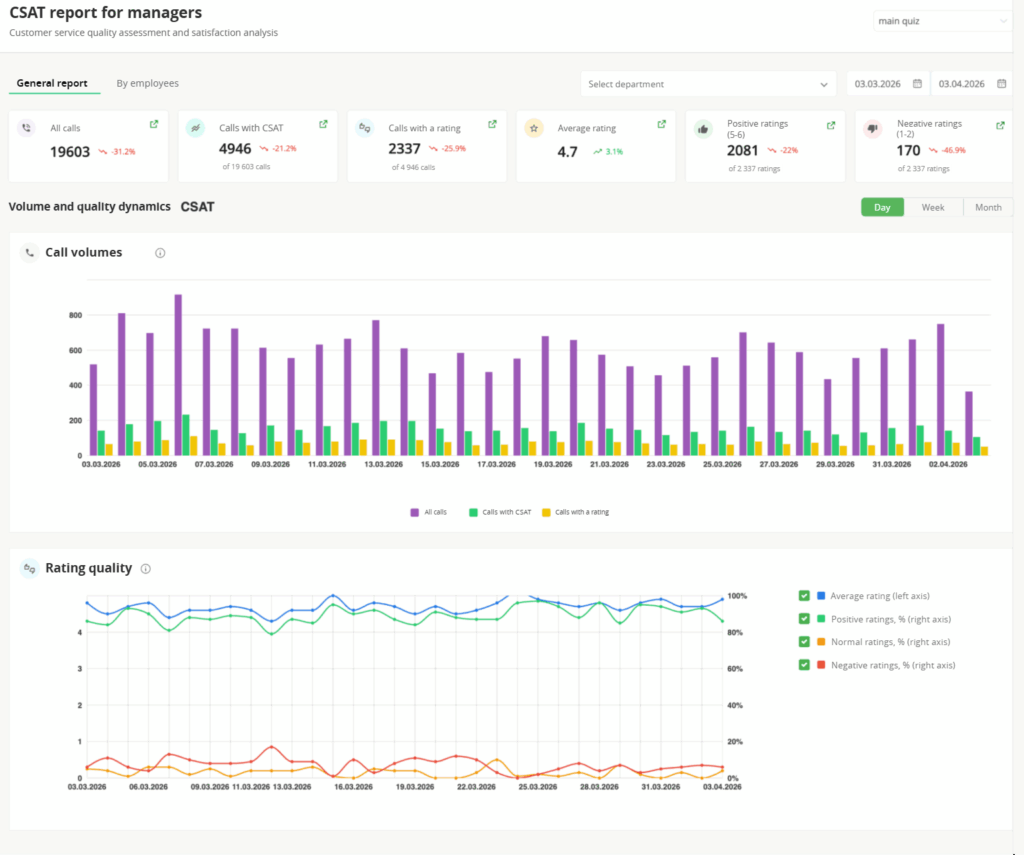
- Added dedicated dashboards for CSAT, messenger performance, and the AI call-quality dashboard mentioned above
- Redesigned the Message Log and the Profile Settings page, now with the option to upload an employee photo
What this means for your business. Managers find the calls and data they need faster, and teams handle missed inquiries and communication quality in one place, instead of pulling information manually from different sections.
Use case. A sales rep misses several calls during a meeting. The manager sees the unhandled missed calls in the report with flexible filters, sets up an automatic callback right from the account dashboard, and no lead falls through the cracks. To keep track of how the team is handling inquiries overall, the manager checks the CSAT and messenger performance dashboards once a week, getting the full picture without manually pulling data from separate reports.
Ringostat Smart Phone Responds Faster
The Ringostat Smart Phone app got dozens of improvements this year ― not one headline feature, but a systematic boost in speed and usability.
What we did:
- You can now accept or decline a call right from a push notification without opening the app, and we added custom hotkeys for call control on desktop
- Added text status labels for employees throughout the app, so colleagues can immediately see who’s on a call, offline, or set to “Do Not Disturb,” without wasting time calling someone who won’t pick up anyway
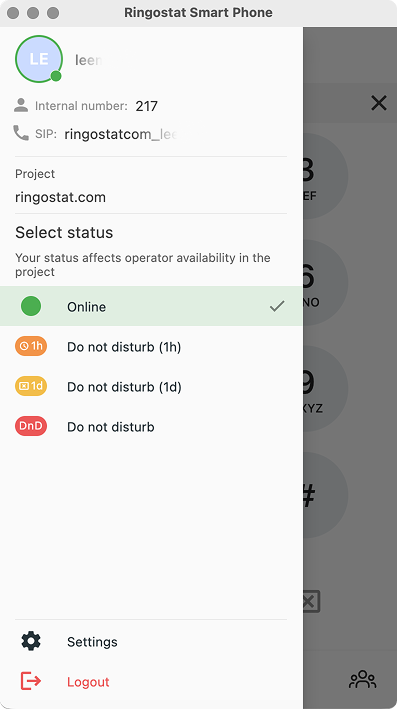
- Built automatic “Do Not Disturb” activation after a call ends, giving reps time to finish updating a customer record or add a note before the next call comes in
- Introduced a separate “Decline” status for calls a rep rejects manually, so managers can now distinguish deliberate declines from calls missed due to actual workload
- Added WhatsApp support as another messaging channel
- Enabled Android users to call through RSP directly from mobile CRMs and other apps in a single click
- Built background monitoring for internet connection quality, so reps spot connectivity issues before customers do
What this means for your business. Sales reps get an accurate view of colleagues’ real availability and don’t lose their status during connectivity issues, while managers get accurate real-time reporting even when part of the team works from mobile devices.
Use case. A rep traveling for work gets an incoming WhatsApp message right in RSP, sees the customer’s name instead of an anonymous number, and replies from the same app they just used to end a call ― no switching between services.
It’s worth noting that Ringostat Smart Phone’s active user base keeps growing, especially on mobile. Between Q1 2025 and Q1 2026, active Android users more than doubled (+118%), iOS users grew by 89%, and the total across all platforms grew by 40%. Teams are increasingly choosing a single app instead of juggling separate tools for calls and messaging.
Read also: Ringostat Smart Phone 2.0: an overview of all the features for effective lead processing
CRMs Now Pull in More Data on Their Own
This year, we focused not just on quantity ― we shipped 11 new integrations in total ― but also on the quality of data flowing into CRMs.
What we did:
- Added new out-of-the-box integrations, including Poster, Raynet, DocDream, Beauty Pro, and User.com, and released an updated, faster version of the Odoo integration
- Expanded deal and lead syncing to selected pipelines ― now covering not just calls, but also website form submissions ― for Pipedrive, ZohoCRM, and HubSpot
- Standardized phone number formatting across several CRMs to eliminate duplicate customer records
- Added new parameters to Webhooks for more precise call-handling quality analytics
What this means for your business. Your CRM gets more than just a record that a call happened ― it gets full context: the outcome of the conversation, communication quality, and data ready for AI analysis, all without the risk of creating duplicate customer records due to inconsistent phone number formats.
Use case. A customer calls from an international number that previously created a “new” contact in the CRM, even though they were already in the database. Now the system recognizes them correctly, so the rep immediately sees the full communication history instead of working with a duplicate.
Conclusion
This year, Ringostat moved from monitoring communications to actively participating in them. The AI Voice Agent marks a major first step in that direction: the system can now not only analyze conversations, but also handle inbound and outbound calls on its own, resolve routine requests, and hand off anything that genuinely needs a human touch.
At the same time, we kept simplifying day-to-day communication work ― from telephony and analytics to integrations and reporting. The result is a platform that gives businesses more than just a list of features: less manual work, and more control over what happens with every customer interaction.
Ringostat is gradually taking routine work off your team’s plate, so people can focus where they’re actually needed. Fewer app switches, fewer manual steps, more time for the business itself.
