


How many calls does a company make or receive every day that sound almost identical? “Please confirm your order,” “This is a reminder about tomorrow’s appointment,” “Would now be a good time to make the payment?” ― these are just a few examples of the routine conversations that happen daily.
At first glance, none of this seems complicated. But a company can handle dozens or even hundreds of these calls a day, and each one eats into a sales rep’s time, even though it rarely requires their actual expertise. Scenarios like these are prime candidates for automation.
That’s exactly why Ringostat built the AI Voice Agent. It’s a conversational AI agent that can take over calls based on clear scenarios, without turning the conversation into a robotic script reading. The agent keeps the dialogue going, responds to what the other person says, and brings in a sales rep whenever it’s needed.
Let’s look at how it works, how it differs from a standard auto-dialer, which tasks it can handle on its own, and when a call should still be handed off to a human.
What Is an AI Voice Agent
An AI Voice Agent is a conversational agent powered by artificial intelligence that can make and receive phone calls on its own. Unlike the traditional idea of a “robot on the phone,” it doesn’t just play back a pre-recorded message from start to finish. At its core is a language model that recognizes the caller’s questions, keeps track of the entire conversation, and generates responses on the fly, drawing on the company’s knowledge base uploaded to the account.
In practice, this means the agent:
- addresses the person by name;
- asks follow-up questions when a customer’s answer is unclear;
- responds to off-script questions instead of getting stuck;
- logs the outcome of the call with a short summary;
- hands the conversation off to a sales rep, along with context, whenever needed.
The AI Voice Agent runs 24/7 and covers voice communication whenever a sales rep simply can’t keep up ― in the evenings, on weekends, during holidays, or at peak load ― freeing up the team’s time for more complex work.
Getting Started With AI Voice Agent
Setting up AI Voice Agent fully takes a few working days, but a simple scenario can be launched in a matter of hours. The dashboard is intuitive and walks you through every step of the setup.
To get started with AI Voice Agent, you’ll need:
- an active Ringostat business phone system account ― AI Voice Agent runs on top of it, so setup is faster and easier if you’re already using the platform;
- alternatively, you can connect a different phone provider, in which case you’ll need that provider’s SIP account details;
- your own SIP account;
- a contact database, if you’re planning outbound campaigns (for example, re-engaging a dormant list or sending confirmation calls);
- registration in the AI Voice Agent workspace via the link.
Inside the Workspace
Once you’re connected, everything else happens in the dashboard. There, you can:
- create a new campaign and choose its type;
- configure the logic: campaign start time, working hours, active days, number of call attempts, number of channels, and so on;
- provide a URL endpoint for sending data after each call;
- use ready-made scripts if needed ― pick your industry, and the system will pull instruction examples specific to your field;
- upload your knowledge base and contact list, either through a CSV file or via API;
- track call results in reports, which can also be synced to your CRM.
Read also: How an AI Voice Agent Saves TI Over 190 Working Hours a Month
Setting Up a Campaign
To create a new campaign, open the “Campaign Panel” tab in your dashboard and click “New Campaign.”
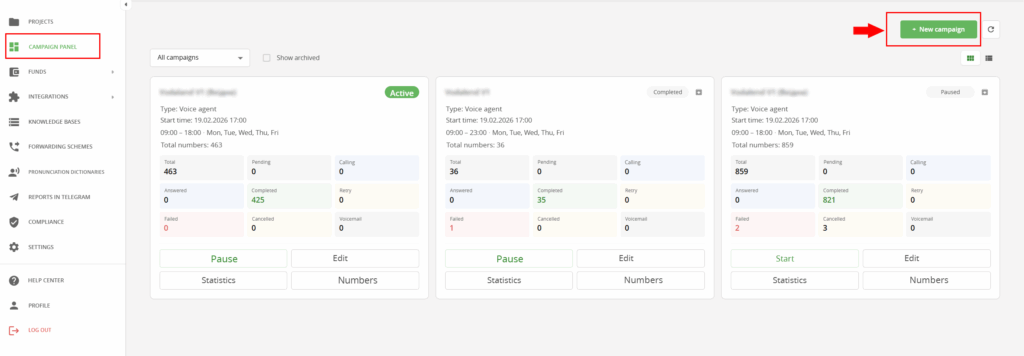
Setting up a campaign starts with choosing its type, and this determines which configuration logic opens up next.
From the outside, every AI Voice Agent call looks the same: an agent speaking in a natural voice. But the underlying script and the campaign’s goal differ significantly depending on how complex an interaction the business actually needs.
Based on the platform’s use-case scenarios, campaigns fall into three complexity levels: informational, interactive, and voice agent.
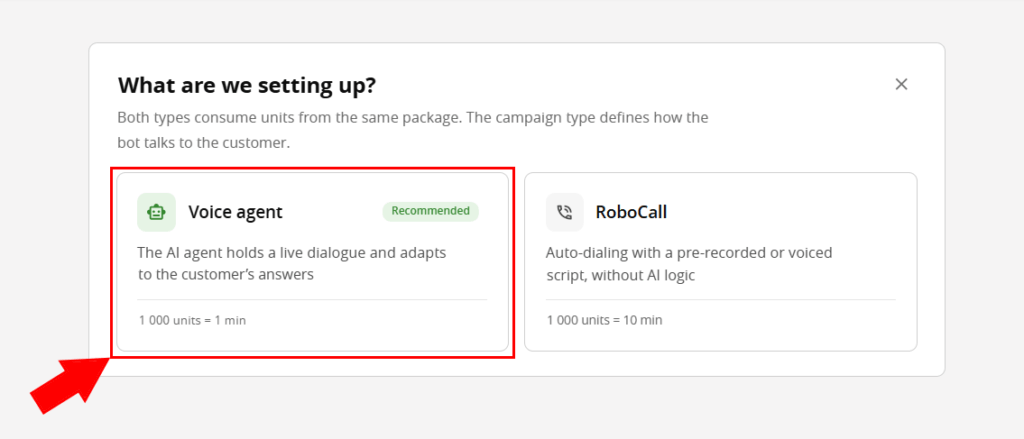
Voice Agent
Voice Agent. This is the most advanced campaign type. It runs a free-flowing voice dialogue, understands open-ended customer responses, qualifies inquiries, and passes on a “warm” lead along with a summary of the conversation. This can be an outbound campaign ― systematically working through a dormant contact list ― or an inbound line, where the agent figures out what a caller needs and routes the inquiry accordingly.
Typical examples include re-engaging customers who haven’t been in touch for a while, or handling and qualifying inbound calls instead of a live operator.
Ready-Made Scripts
For the Voice agent, we’ve built ready-made scripts that make setup faster and easier. Users can select their industry, and the system pulls instruction examples specific to that field rather than generic ones.
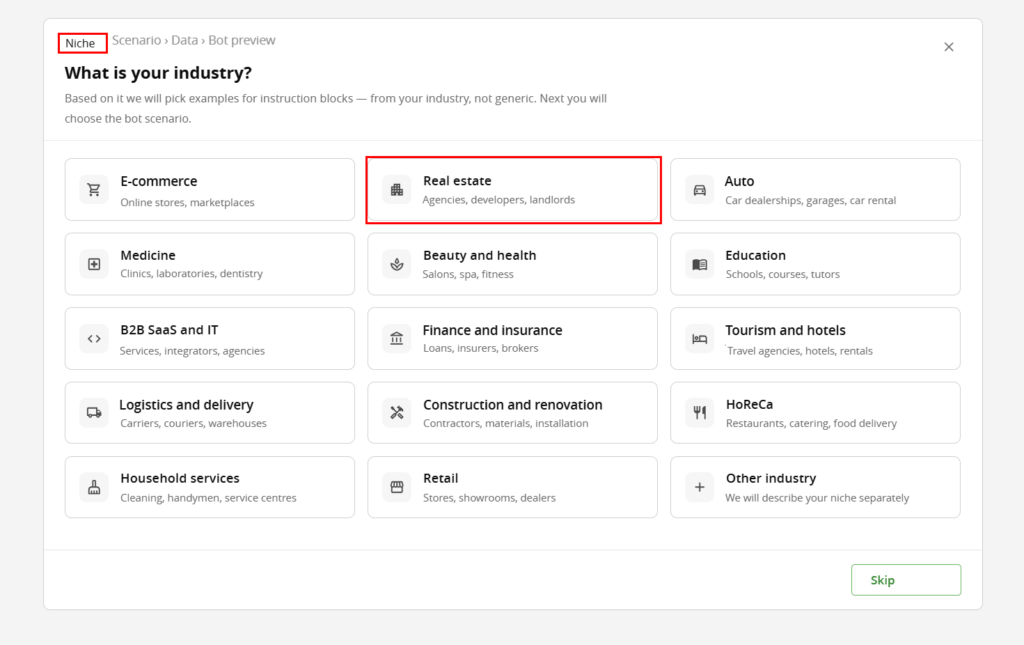
Next, you choose a bot scenario. Say you work in real estate. After selecting that industry, you can describe the task you need the voice agent to handle in the AI Builder. Based on your description, the system will draft instructions for the bot once you click “Generate Blocks.” Alternatively, you can pick one of the ready-made scenarios below.
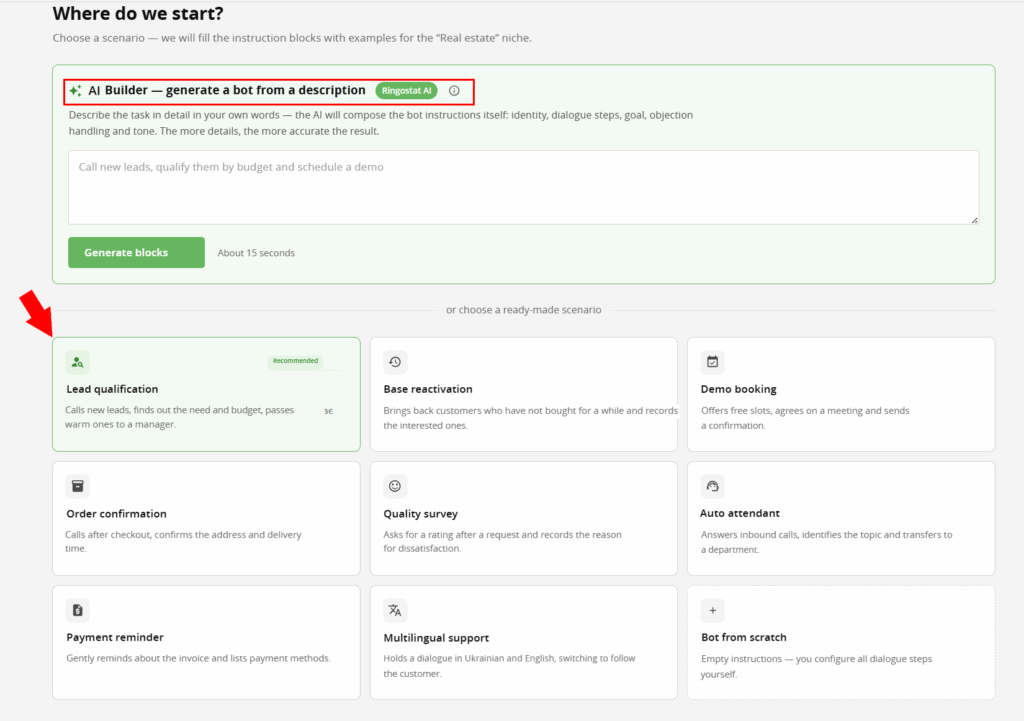
Let’s say your main goal for the voice agent is lead qualification. You want the bot to call new customers, find out their needs and budget, and then hand “warm” leads over to your sales reps. Click the “Lead Qualification” block, and you get all of that without any extra steps.
Once you’ve chosen a scenario, all that’s left is to describe your company or business in more detail. The AI will break your description down into the instruction blocks defined by the scenario template ― call context, key facts, customer profile. You can also add a link to your website so the AI can pull information from your homepage about what your company does, its services, terms, service area, and so on.
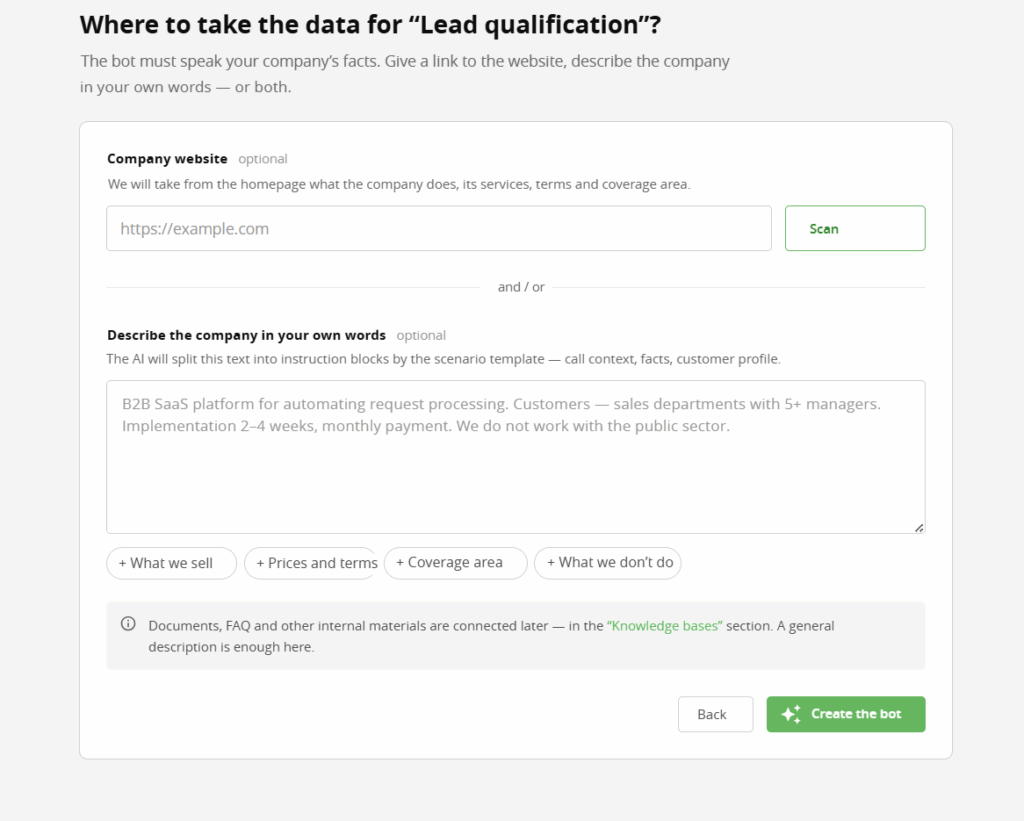
At this stage, you’re only giving the bot general information about your company. Documents, FAQs, and other internal materials are added later, in the “Knowledge Base” section. Let’s move on to that.
Knowledge Base
A ready-made scenario only sets the logic of the conversation ― what to do at each step. What the agent actually says to the customer comes from the knowledge base, which you upload separately in the dashboard. You’ll find it in the tab of the same name, and you can upload material by clicking “Add New.”
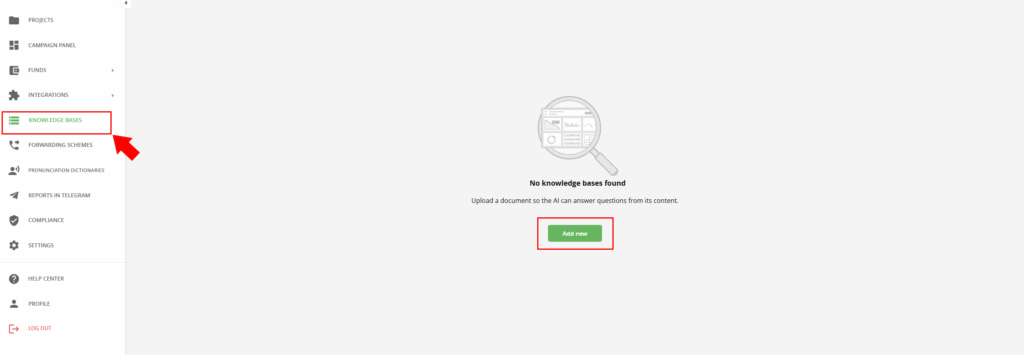
Your knowledge base should include:
- descriptions of your products or services and their features;
- pricing and payment terms;
- delivery or booking conditions;
- answers to frequently asked customer questions (FAQ).
The distinction between the scenario and the knowledge base matters: the scenario defines how the conversation flows, while the knowledge base defines what the agent knows about your business. Thanks to the knowledge base, the agent can give substantive answers even to questions the scenario didn’t anticipate, instead of going silent or unnecessarily transferring the call to a rep.
Statistics: Checking the Results
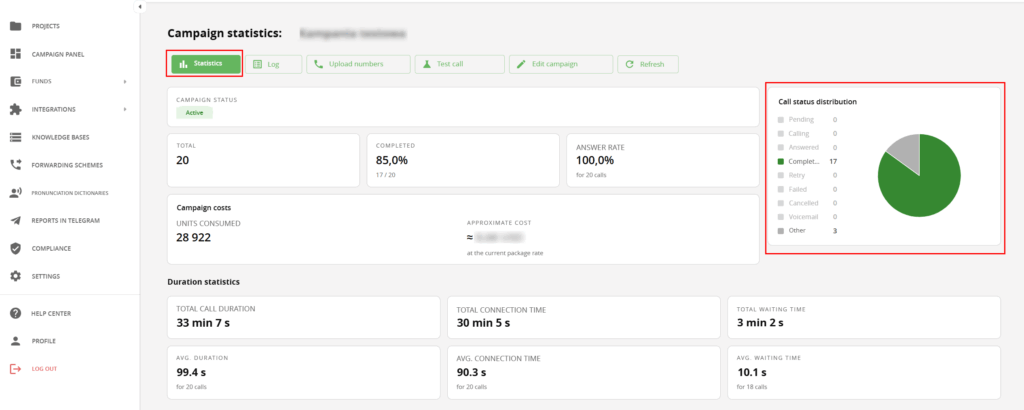
Once a campaign is live, you need to know whether it’s working. The outcome of every call, regardless of campaign type, is logged automatically and appears immediately in the dashboard report, and in your CRM if that’s been set up. You can view it in the dashboard by clicking “Statistics” under a specific campaign.
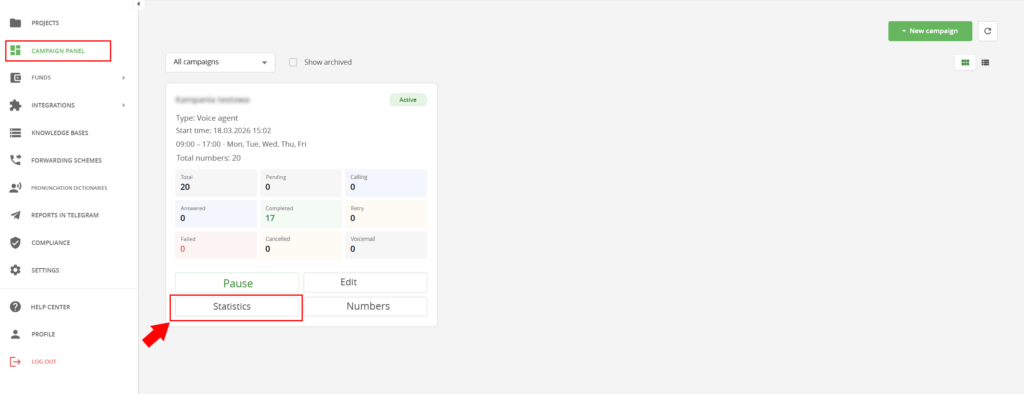
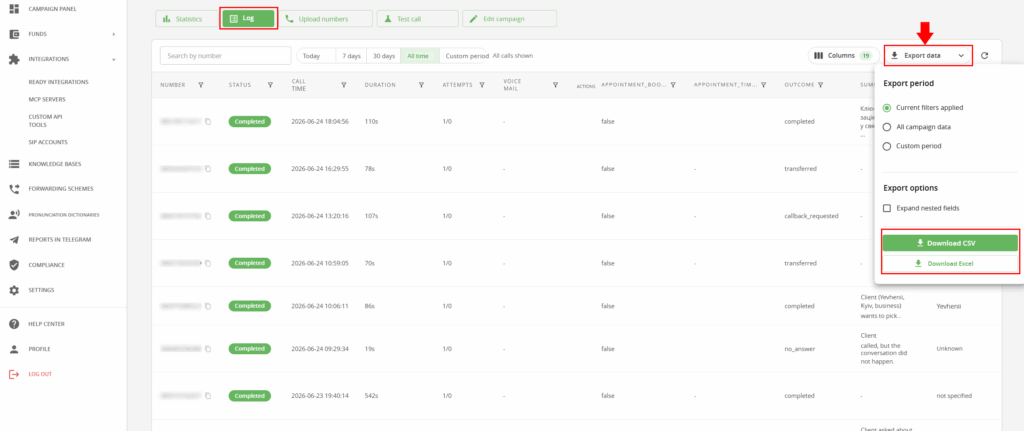
For each call, the “Log” report tab shows:
- the call status (for example: confirmed / declined / interested / transferred to a rep);
- call duration and time;
- key data the agent gathered during the call (for interactive campaigns and the voice agent);
- the customer’s contact details, for follow-up or analysis.
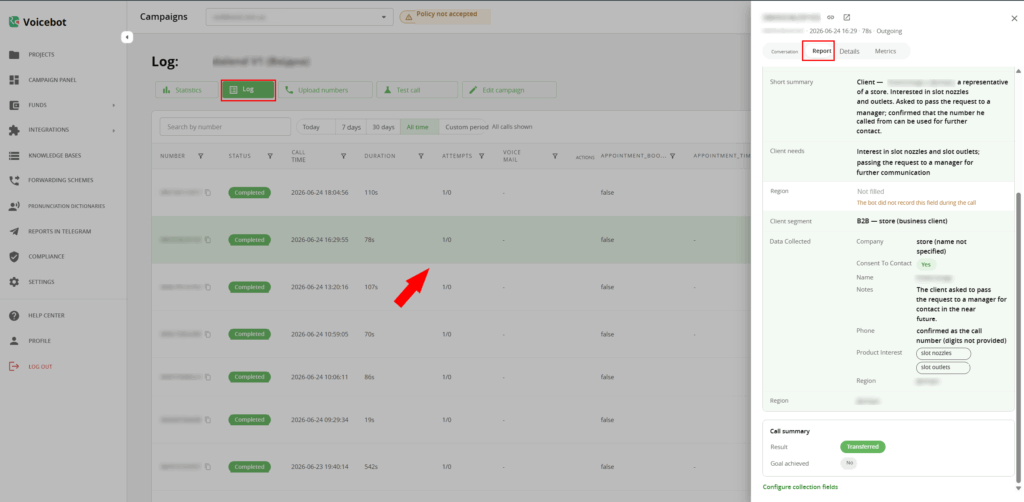
This kind of report doesn’t just show the outcome of a single call ― it lets you evaluate the campaign as a whole: how many contacts were processed, what share confirmed their intent, and how many leads were passed on to sales reps. This matters especially for voice agent campaigns, where conversion into a “warm” lead is the key performance metric.
You don’t have to analyze dashboard data manually every time: reports can be exported, for example to build a consolidated campaign analysis in Excel or CSV.
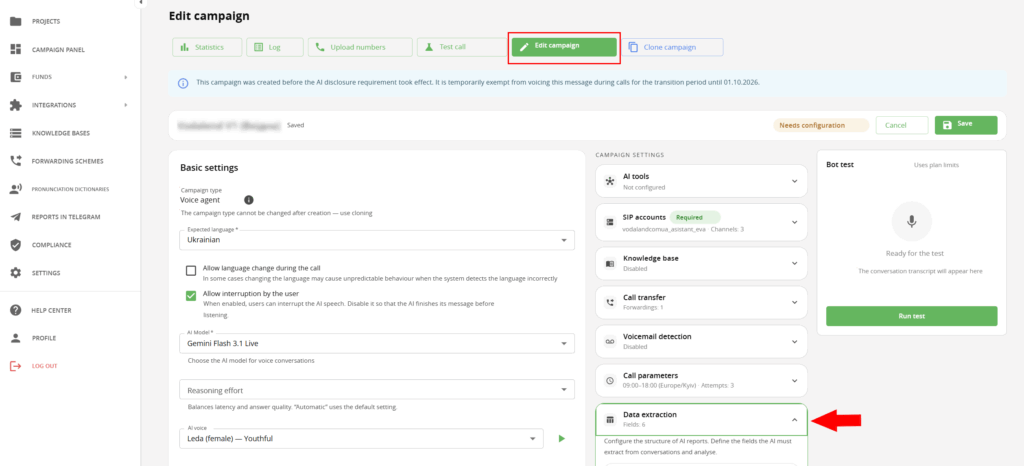
The same goes for CRM syncing: call results land there automatically, with no manual entry required from a rep. You can review which fields the AI extracts for reports, and adjust the settings, by clicking “Edit Campaign.”
RoboCall: Informational and Interactive Campaigns
If you want to use AI Voice Agent for simpler campaigns, you can choose the informational or interactive type by clicking the tab next to Voice Agent, called RoboCall.
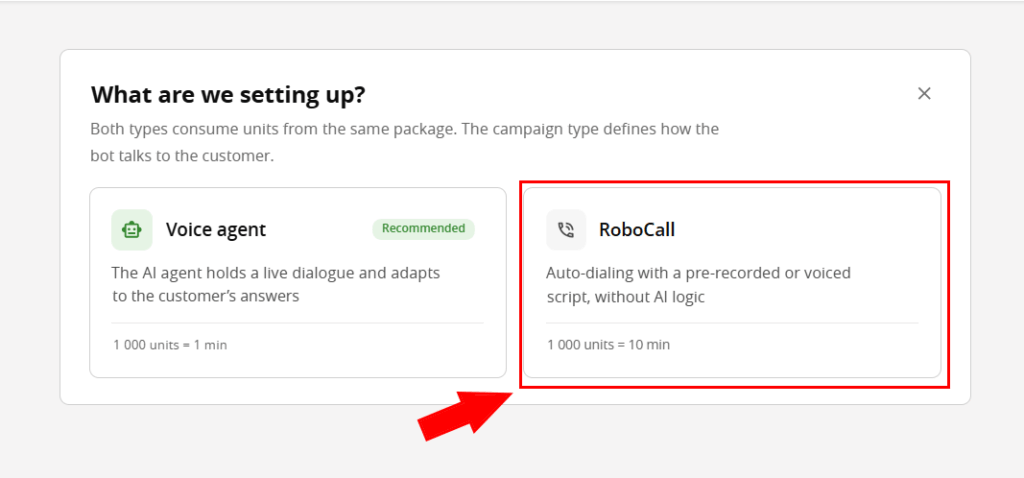
Informational campaign. This is the simplest type: the agent calls to deliver or confirm one specific piece of information ― order details, appointment time, a payment reminder. The dialogue is short and predictable: the customer just needs to confirm, clarify one detail, or decline. This is the closest relative of a classic auto-dialer, and it doesn’t rely on AI logic.
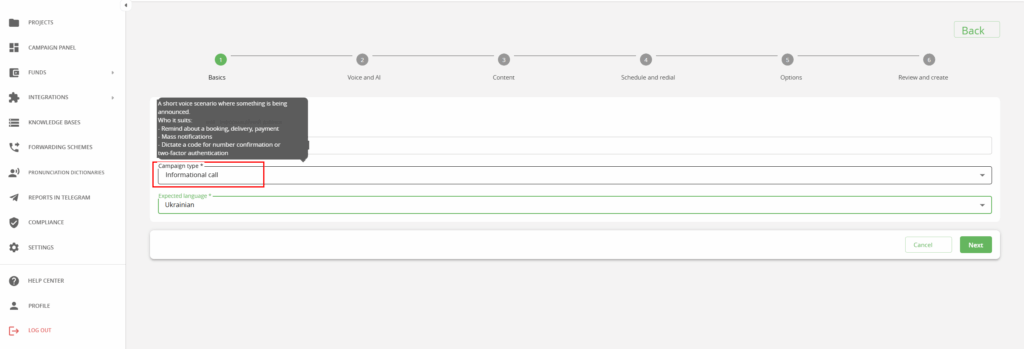
A typical example is a payment confirmation call sent right after an order is placed in an online store.
In the same dropdown, alongside the informational campaign, you can also select an interactive survey.
Interactive campaign. This is a sequential survey where the customer responds by pressing a button on their keypad (DTMF) rather than speaking. It works well for questionnaires, feedback collection, NPS surveys, and voting.
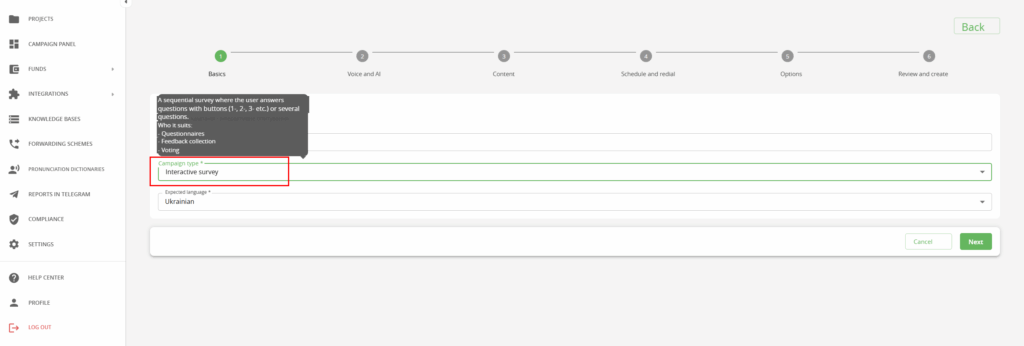
A typical example is an NPS survey for a beauty community, where customers rate the service by pressing a button instead of answering out loud.
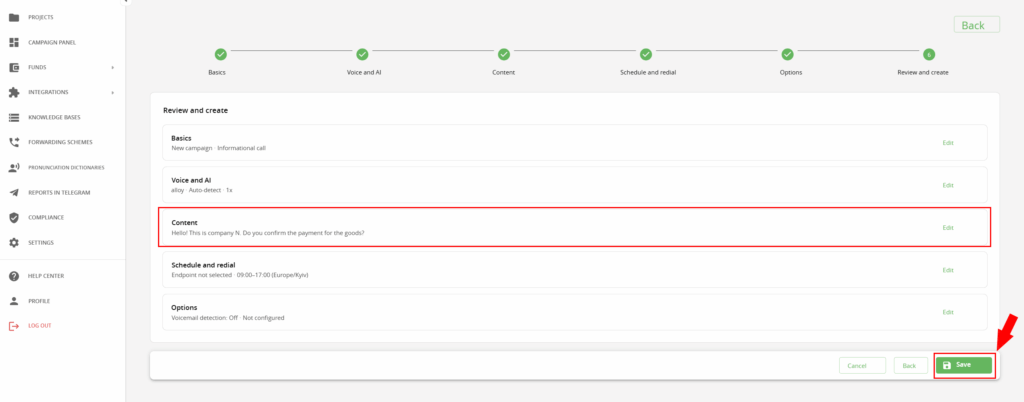
Setting up either of these simpler campaigns takes five steps:
- Basics ― campaign type, language, name.
- Voice ― the AI Voice Agent’s voice type.
- Content ― or a ready-made audio file, if needed.
- Schedule ― call times, number of attempts, interval between them.
- Options ― sending results to your CRM or, for example, Telegram.
At the “Review and Create” step, you can edit any of the previous settings and save the campaign.
How It Works: Inbound and Outbound Calls
When a customer calls in. AI Voice Agent picks up in about two seconds ― faster than a human could physically reach the phone. From there, the agent runs the conversation using the company’s knowledge base, and once it’s done, it logs the outcome in a report available in the dashboard and, if configured, in your CRM. If the situation goes beyond what the agent can handle, the call is transferred to a rep along with the customer’s data.
When the agent calls out. Here the logic is different: the agent works from a contact list, calls on a set schedule (date and time), holds a conversation, asks clarifying questions, and responds to what the customer says instead of just reading out a message. The outcome of every call is logged in the dashboard and CRM, and leads who show they’re ready to talk to a person are handed off to a rep along with a short summary of the context.
Technical Capabilities and Scale
AI Voice Agent speaks more than 35 languages, which lets a company enter a new market without having to find and hire native speakers.
Capacity is measured in channels:
- one channel handles up to 1,200 calls a day;
- up to 100 channels running simultaneously within a single project can handle up to 120,000 calls a day ― without expanding headcount.
In practice, this removes the dilemma of “hire more people or fail to keep up with peak load.” Instead of hiring, you can simply add another channel.
Read also: AI Voice Agent: Your Always-On Virtual Manager
Conclusion
Routine calls have long been the part of sales and support work that had to be done manually, simply because no tool existed that could handle it well. AI Voice Agent closes exactly that gap: it takes on up to 90% of routine voice communication, and according to Ringostat customer data, the cost of such a call turns out to be up to ten times lower than paying a full-time employee. That leaves the team free to focus on what genuinely needs human attention ― complex negotiations and non-standard deals ― while the agent handles the rest.
Not using an AI Voice Agent yet? Follow the link and start a new stage of call automation right now.
